

Document Retrieval#
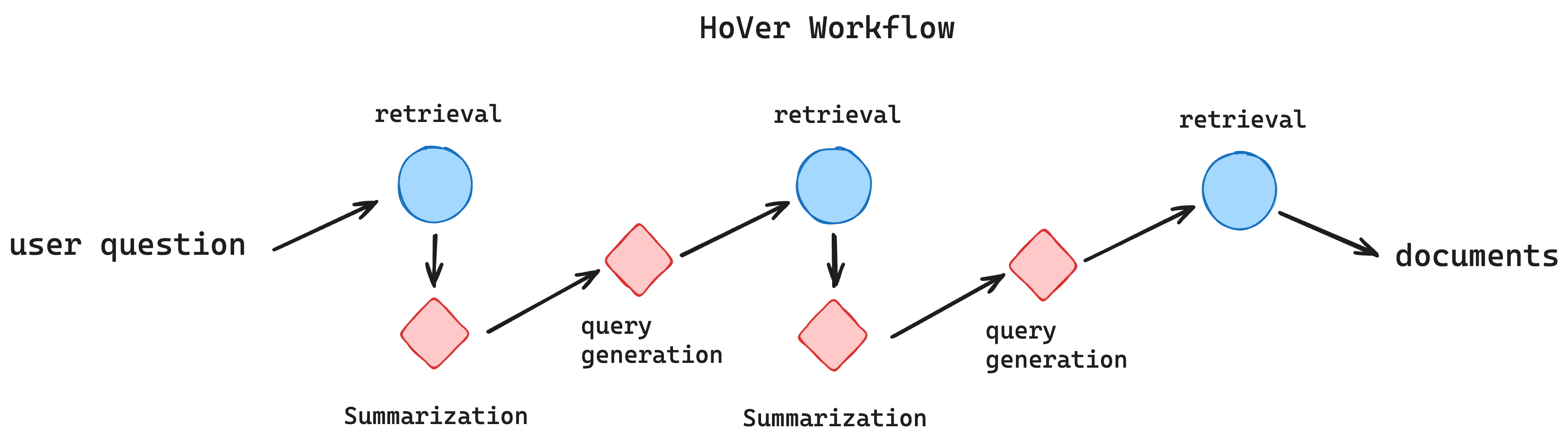
In this example, we build a three-hop document retrival workflow for HoVer. The workflow gathers related context to verify a given claim. We aim to improve the f1-score over the retrieved documents.
The workflow two types of agents (4 in total):
Query agent: generates a search query for retrieval.
Summarize agent: extracts useful points in the given documents.
1) Setup#
First, let’s set the environment for workflow execution. Following keys are required:
OPENAI_API_KEY=”your-openai-key”
COLBERT_URL=”colbert-serving-url”
Note:
If you are using DSPy’s ColBERT service, try link
http://20.102.90.50:2017/wiki17_abstracts.For hosting on your local machine, check ColBERT official repo for installation and setup.
2) Check Hover Workflow#
The complete code for this workflow is based on dspy and is avaibale in workflow.py.
The workflow returns the pid of all retrieved passages, which will be used to calcuate the f1-score.
Try it out with:
%run workflow.py
{'pred_docs': (670219, 821694, 1513707, 4434531, 4751601, 670219, 813146, 821694, 821694, 1722727)}
3) Optimize The Workflow#
The workflow entry point is already registered using annotation cognify.register_workflow.
Here we configure the optimization pipeline:
Define the evaluation method
Define the data loader
Config the optimizer
3.1 Use F1 as the retrieval metric#
We use builtin f1_score_set to measure the overlap between retrieved documents and the ground truth.
import cognify
from cognify.hub.evaluators import f1_score_set

@cognify.register_evaluator
def doc_f1(pred_docs, gold_docs):
    pred_docs = set(pred_docs)
    gold_docs = set(gold_docs)
    return f1_score_set(pred_docs, gold_docs)
3.2 Load the Data#
We provide the example data in qas._json file for you to start with.
!head -n 1 qas._json
{"qid":0,"question":"Skagen Painter Peder Severin Kr\u00f8yer favored naturalism along with Theodor Esbern Philipsen and the artist Ossian Elgstr\u00f6m studied with in the early 1900s.","support_pids":[670219,1513707,811545],"support_facts":[[670219,0],[670219,1],[1513707,1],[811545,2]],"support_titles":["Kristian Zahrtmann","Peder Severin Kr\u00f8yer","Ossian Elgstr\u00f6m"],"num_hops":3,"label":1,"uid":"330ca632-e83f-4011-b11b-0d0158145036","hpqa_id":"5ab7a86d5542995dae37e986"}
The data should be formatted to align with the function signature of both the workflow entry point and the evaluator.
Signatures are:
workflow (claim) -> {‘pred_docs’: …}
evaluator (pred_docs, gold_docs) -> float
Thus the dataloader should provide a tuple of dictionaries like this:
(
    {'claim': ...},
    {'gold_docs': ...},
)
The complete data loader code is provided below.
train_size = 100
val_size = 50
dev_size = 200
data_path = 'qas._json'
seed = 0

import json
import random

@cognify.register_data_loader
def load_data():
    data = []

    # only include difficult examples with 3 hops
    with open(data_path, 'r') as file:
        for line in file:
            obj = json.loads(line)
            if obj['num_hops'] == 3:
                data.append(obj)

    rng = random.Random(seed)
    rng.shuffle(data)

    def formatting(x):
        input = {'claim': x['question']}
        ground_truth = {'gold_docs': x['support_pids']}
        return (input, ground_truth)

    train_set = data[:train_size]
    val_set = data[train_size:train_size+val_size]
    dev_set = data[train_size+val_size:train_size+val_size+dev_size]

    train_set = [formatting(x) for x in train_set]
    val_set = [formatting(x) for x in val_set]
    dev_set = [formatting(x) for x in dev_set]
    return train_set, val_set, dev_set
3.3 Config the optimizer#
Let’s use the default configuration to optimize this workflow. The search space includes:
2 fewshot examples to add for each agent
whether to apply Chain-of-thought to each agent
This workflow invokes many agents, we set the parallel level to 50 to accelerate the process. Please check your OpenAI rate limit and set accordingly.
from cognify.hub.search import default

search_settings = default.create_search(evaluator_batch_size=50)
4) Start the Optimization#
You can save the above configs in config.py file and use Cognify’s CLI to fire the optimization with:
$ cognify optimize workflow.py
Alternatively you can run the following:
train, val, dev = load_data()

opt_cost, pareto_frontier, opt_logs = cognify.optimize(
    script_path="workflow.py",
    control_param=search_settings,
    train_set=train,
    val_set=val,
    eval_fn=doc_f1,
    force=True, # This will overwrite the existing results
)
5) Optimization Results#
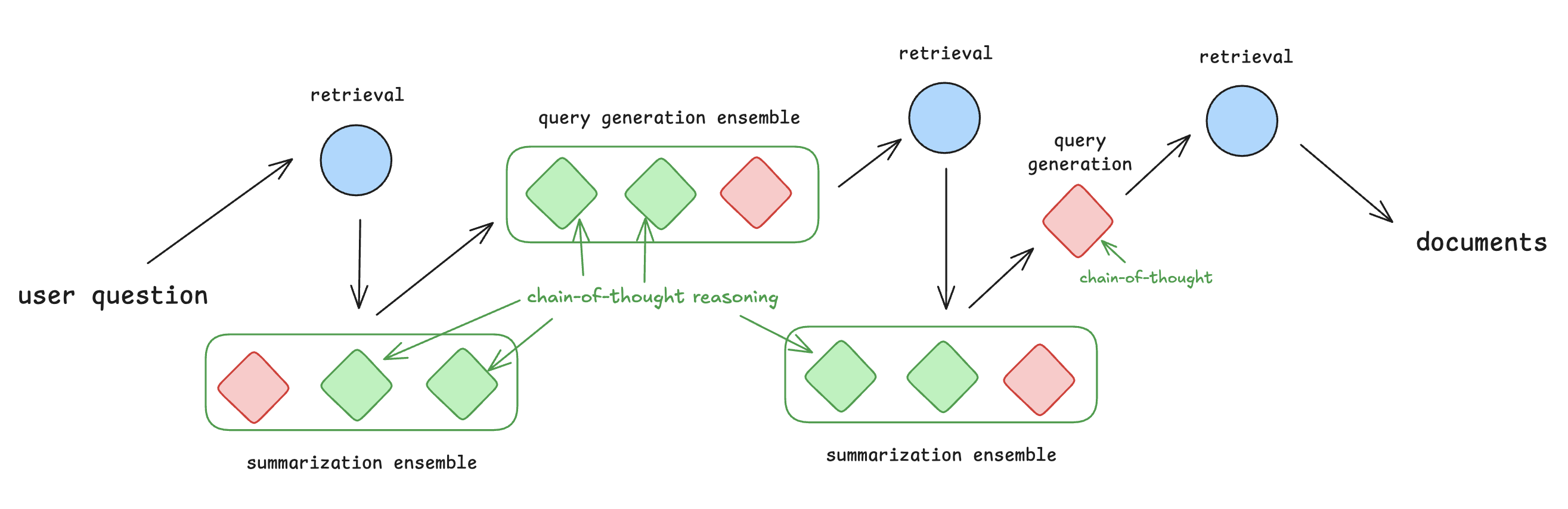
Cognfiy will output each optimized workflow to a .cog file. For this workflow, the optimizer applies the following optimizations to specific agents:
ensemble both summarizers
for the first summarizer, use chain-of-thought for two of the ensembled modules
for the second summarizer, use chain-of-thought for one of the ensembled modules
ensemble the first query generation module
use chain-of-thought for two of the ensembled modules
use chain-of-thought for the final query generation module
The final optimized workflow is depicted below, with optimizations highlighted in green.
Check out more details on how to interpret optimization results.