

Text-to-SQL#
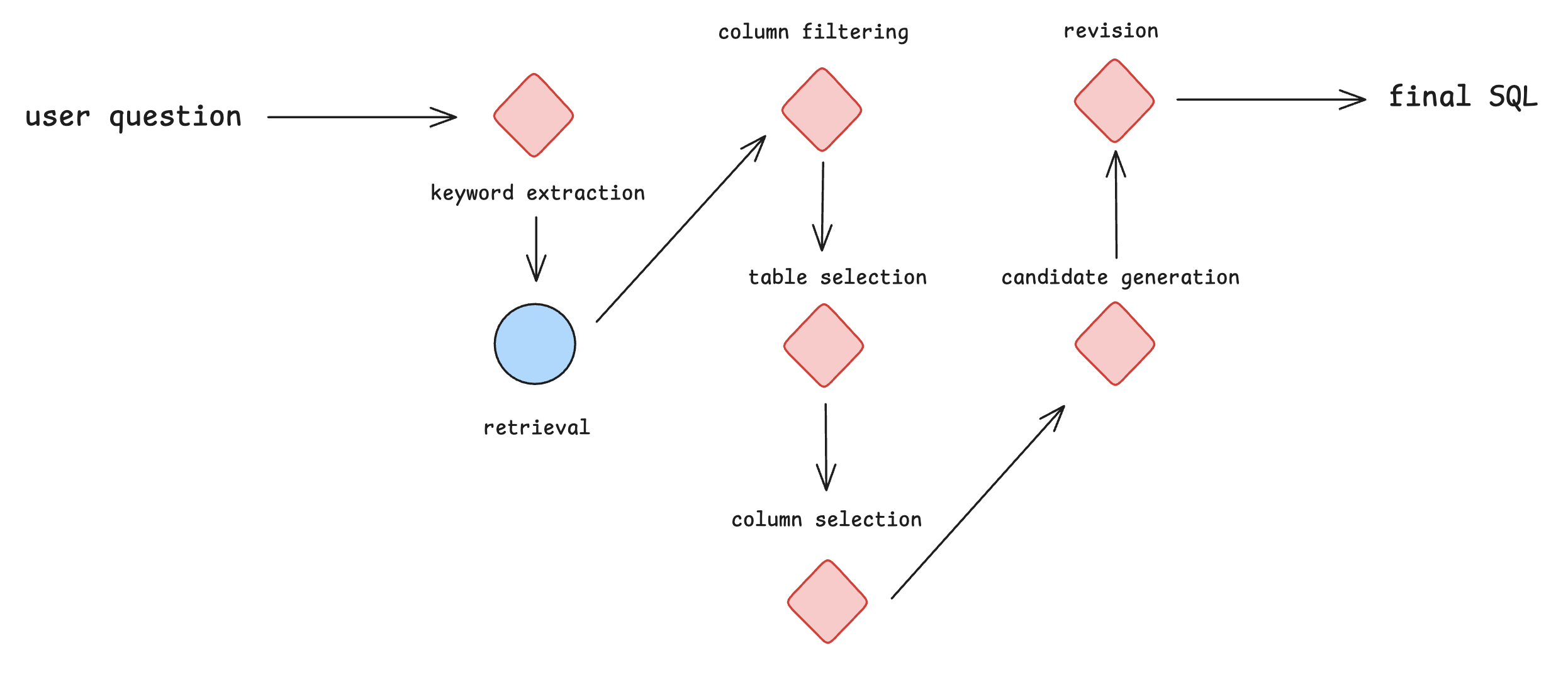
In this example, we adapt the code from the paper CHESS: Contextual Harnessing for Efficient SQL Synthesis.
The workflow is as follows:
To try this example, you should create and activate a new python virtual environment and then run the following commands:
    pip install -r requirements.txt
    pip install pysqlite3-binary
    pip install -U cognify-ai
Next, run the pre-processing script in ./run/run_preprocess.sh to create the databases. This should generate a data folder. Ensure your .env file contains the following keys:
OPENAI_API_KEYDB_ROOT_PATH, which should be set to the path ofdata/dev
Data loader#
The original repository expects command line arguments passed into its data-loader. We can preserve the original parser function and just set the arguments in the script itself. This dataset does not contain a ground truth, so we pass in an empty dictionary {} as the second value in the tuple.
Then, we use the data files generated by the pre-processing step in the data folder.
import json
import cognify
from src.utils import parse_arguments

import cognify
import numpy as np

import dotenv
dotenv.load_dotenv()

@cognify.register_data_loader
def load_data():
    args = parse_arguments() #

    def read_from_file(data_path, args):
        with open(data_path, "r") as file:
            dataset = json.load(file)

        inputs = []
        for data in dataset:
            inputs.append(
                {
                    'args': args,
                    'dataset': [data],
                }
            )
        eval_data = [(input, {}) for input in inputs] # no ground truth in this case, set to empty dictionary
        return eval_data

    all_train = read_from_file('data/dev/other_sub_sampled.json', args)
    test_set = read_from_file('data/dev/sub_sampled_bird_dev_set.json', args)

    # shuffle the data
    all_train = np.random.permutation(all_train).tolist()
    return all_train[:100], all_train[100:], test_set[:10]
Evaluator#
In this case, the SQL code is executed during the workflow in a sandbox environment. Hence, our evaluator does not need to re-execute the code. Instead, it can just return whether the result was correct as a numerical value.
@cognify.register_evaluator
def eval_text_to_sql(counts):
    """
    Evaluate the statistics of the run.
    """
    correct = any(vs['correct'] == 1 for vs in counts.values())
    return correct
Configuring the Optimizer#
We’ve created a search option for text-to-sql that searches over the following:
Chain-of-Thought reasoning
Planning before acting
2 few-shot examples
An ensemble of 3 agents for a task
Let’s use these search settings to conduct the optimization.
from cognify.hub.search import text_to_sql
search_settings = text_to_sql.create_search()
Start the optimization#
We’ve provided the 3 code blocks above in configy.py. With the Cognify command line interface (CLI), you can start the optimization like this:
$ cognify optimize workflow.py
Alternatively, you can run the following cell (warning: this workflow may run for quite some time):
train, val, dev = load_data()

opt_cost, pareto_frontier, opt_logs = cognify.optimize(
    script_path="workflow.py",
    control_param=search_settings,
    train_set=train,
    val_set=val,
    eval_fn=eval_text_to_sql,
    force=True, # This will overwrite the existing results
)
Optimization Results#
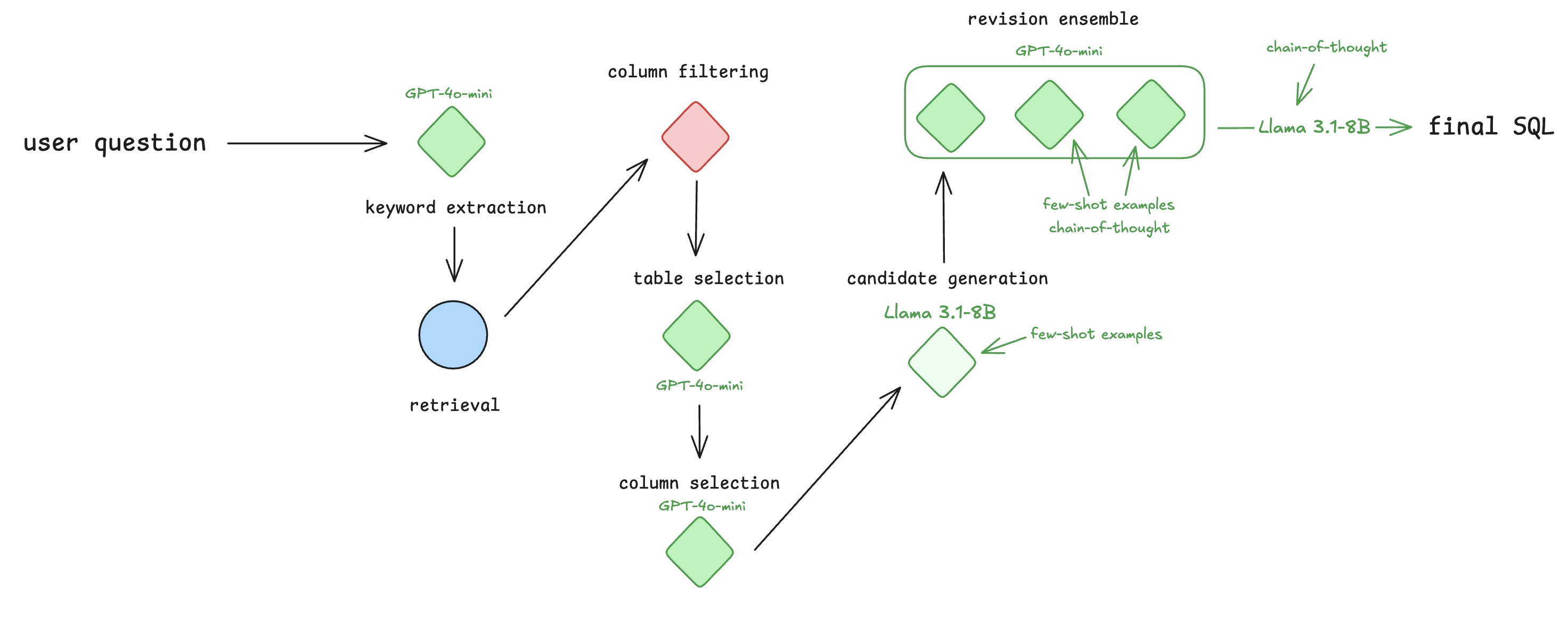
Cognfiy will output each optimized workflow to a .cog file. For this workflow, the optimizer applies the following optimizations:
use GPT-4o-mini for keyword extraction, table selection and column selection
use Llama 3.1-8B along with few-shot examples for candidate generation
ensemble revision
use chain-of-thought, few-shot examples, and GPT-4o-mini for two of the ensembled models
use GPT-4o-mini for the third ensembled model
use Llama 3.1-8B along with chain-of-thought reasoning for the aggregator
The final optimized workflow is depicted below, with optimizations highlighted in green.
For candidate generation, the few-shot examples used resemble the following:
Demonstration 1:
Input (question): “Which of these players performs the best in crossing actions, Alexis, Ariel Borysiuk or Arouna Kone?”Input (schema): “
CREATE TABLE Player\n(\n\t'id' INTEGER PRIMARY KEY AUTOINCREMENT,\n\t'player_api_id' INTEGER UNIQUE...”Input (hint): “player who perform best in crossing actions refers to
MAX(crossing);”Reasoning: “To find the player who performs the best in crossing actions, we need to identify the player with the highest
crossingscore in thePlayer_Attributestable. Let’s start by writing a query that selects theplayer_nameandcrossingscore…”Output (query):
SELECT p.player_name, pa.crossing FROM Player p JOIN Player_Attributes pa ON p.player_api_id = pa.player_api_id WHERE p.player_name IN ('Alexis', 'Ariel Borysiuk', 'Arouna Kone') ORDER BY pa.crossing DESC LIMIT 1
For revision, there are a few more input fields needed:
Demonstration 1
Input (question): “List out the atom id that belongs to the TR346 molecule and how many bond type can be created by this molecule?”Input (SQL): “
SELECT T1.atom_id, COUNT(DISTINCT T2.bond_type) AS bond_type_count FROM atom T1 LEFT JOIN bond T2 ON T1.molecule_id = T2.molecule_id WHERE T1.molecule_id = 'TR346' GROUP BY T1.atom_id;”Input (schema): “
CREATE TABLE atom\n(\n\t'atom_id' TEXT NOT NULL, -- 'atom id' description: the unique id of atoms\n\t'molecule_id' TEXT DEFAULT NULL, -- 'molecule id' description: identifying the molecule”Input (query result): “[(‘TR346_1’, 1), (‘TR346_2’, 1), (‘TR346_3’, 1), (‘TR346_4’, 1), (‘TR346_5’, 1), (‘TR346_6’, 1), (‘TR346_7’, 1), (‘TR346_8’, 1)]”
Reasoning: “We need to list the
atom_idthat belongs to the molecule withmolecule_id‘TR346’. We also need to count how many distinct bond types can be created”Output (query): “
SELECT T1.atom_id, (SELECT COUNT(DISTINCT T2.bond_type) FROM bond T2 WHERE T2.molecule_id = 'TR346') AS bond_type_count FROM atom T1 WHERE T1.molecule_id = 'TR346';”
Check out more details on how to interpret optimization results.