

Financial Analysis#
In this example, we optimize a workflow for FinRobot, an agentic application that performs several complex tasks, including market forecasting, document analysis, and portfolio management.
This workflow is very dynamic. There is a group leader that can call upon 11 possible agents in any order it chooses. This means there can be a different LLM pipeline for each end-user request. The leader will loop over different agents from the agent pool until it determines that the task is complete.

1. Setup#
First, set the environment variable for your OPENAI_API_KEY. Then, execute ./prepare_data.sh. This loads the FinGPT Dataset from HuggingFace. Then, import Cognify.
import cognify
2. Data loader#
The original dataset contains a variety of tasks. Specifically, we look at sentiment analysis, headline classification, and financial QA (FiQA). To conduct a holistic assessment of the workflow, we combine these datasets into a single dataset.
import pandas as pd

def load_specific_data(task, mode):
    sentiment_df = pd.read_parquet(f"data/{task}.parquet")
    data = []
    for i, row in sentiment_df.iterrows():
        input = {
            'task': row['instruction'] + "\n" + row['input'],
            'mode': mode
        }
        output = {
            'label': row['output']
        }
        data.append((input, output))
        if i == 99:
            break
    return data

@cognify.register_data_loader
def load_all_data():
    sentiment_data = load_specific_data('sentiment', 'sentiment_analysis')
    headline_data = load_specific_data('headline', 'headline_classification')
    fiqa_data = load_specific_data('fiqa', 'fiqa')

    trainset = sentiment_data[:70] + headline_data[:70] + fiqa_data[:70]
    devset = sentiment_data[70:85] + headline_data[70:85] + fiqa_data[70:85]
    testset = sentiment_data[85:] + headline_data[85:] + fiqa_data[85:]
    return trainset, devset, testset
3. Evaluator#
For sentiment analysis and headline classification, we use F1-score as the evaluator. For FiQA, we use LLM-as-judge.
import json
import litellm
from cognify.hub.evaluators import f1_score_str

def evaluate_sentiment(answer, label):
    return f1_score_str(answer, label)

def evaluate_headline(answer, label):
    return f1_score_str(answer, label)

from pydantic import BaseModel
class Assessment(BaseModel):
    success: bool

def evaluate_fiqa(answer, label, task):
    system_prompt="Given the question and the ground truth, evaluate if the response answers the question."
    messages = [{"role": "system", "content": system_prompt},
                {"role": "user", "content": "You're given the following inputs:\n\nQuestion: " + task + "\n\nGround Truth: " + label + "\n\nResponse: " + answer}]
    response = litellm.completion('gpt-4o-mini', messages=messages, temperature=0, response_format=Assessment)
    assessment = json.loads(response.choices[0].message.content)
    return int(assessment['success'])

@cognify.register_evaluator
def evaluate_all_tasks(answer, label, mode, task):
    if mode == 'sentiment_analysis':
        return evaluate_sentiment(answer, label)
    elif mode == 'headline_classification':
        return evaluate_headline(answer, label)
    elif mode == 'fiqa':
        return evaluate_fiqa(answer, label, task)
    else:
        raise ValueError(f"Invalid mode: {mode}")
4. Configuring the Optimizer#
For this task, we stick with the default search settings. This searches over whether to include Chain-of-Thought reasoning and/or few-shot examples for each agent.
from cognify.hub.search import default

search_settings = default.create_search(
    search_type='light',
    n_trials=10,
    opt_log_dir="optimization_results",
    evaluator_batch_size=20,
)
5. Optimize the Workflow#
The code blocks above are provided in config.py, along with the workflow itself in workflow.py. We recommend using the Cognify command-line interface (CLI) to start the optimization, like so:
$ cognify optimize workflow.py
Alternatively, you can run the following cell (warning: this workflow may run for quite some time):
train, val, dev = load_all_data()

opt_cost, pareto_frontier, opt_logs = cognify.optimize(
    script_path="workflow.py",
    control_param=search_settings,
    train_set=train,
    val_set=val,
    eval_fn=evaluate_all_tasks,
    force=True, # This will overwrite logs for any existing results
)
6. Optimization Results#
Cognfiy will output each optimized workflow to a .cog file. For this dynamic workflow, the optimizer applies the following optimizations to specific agents:
use GPT-4o-mini for the Momentum Factor Researcher, Sentiment Factor Researcher, and Macro Factor Researcher
use chain-of-thought reasoning and GPT-4o-mini for the Growth Factor Researcher, Portfolio Manager, and Liquidity Factor Researcher
use Llama 3.1-8B for the Volatility Factor Researcher, Quality Factor Researcher, and Value Factor Researcher
use chain-of-thought reasoning and Llama 3.1-8B for the Quantitative Analyst and Financial Data Specialist
use GPT-4o-mini and add few-shot examples for the Group Leader
The final optimized workflow is depicted below, with optimizations highlighted in green.
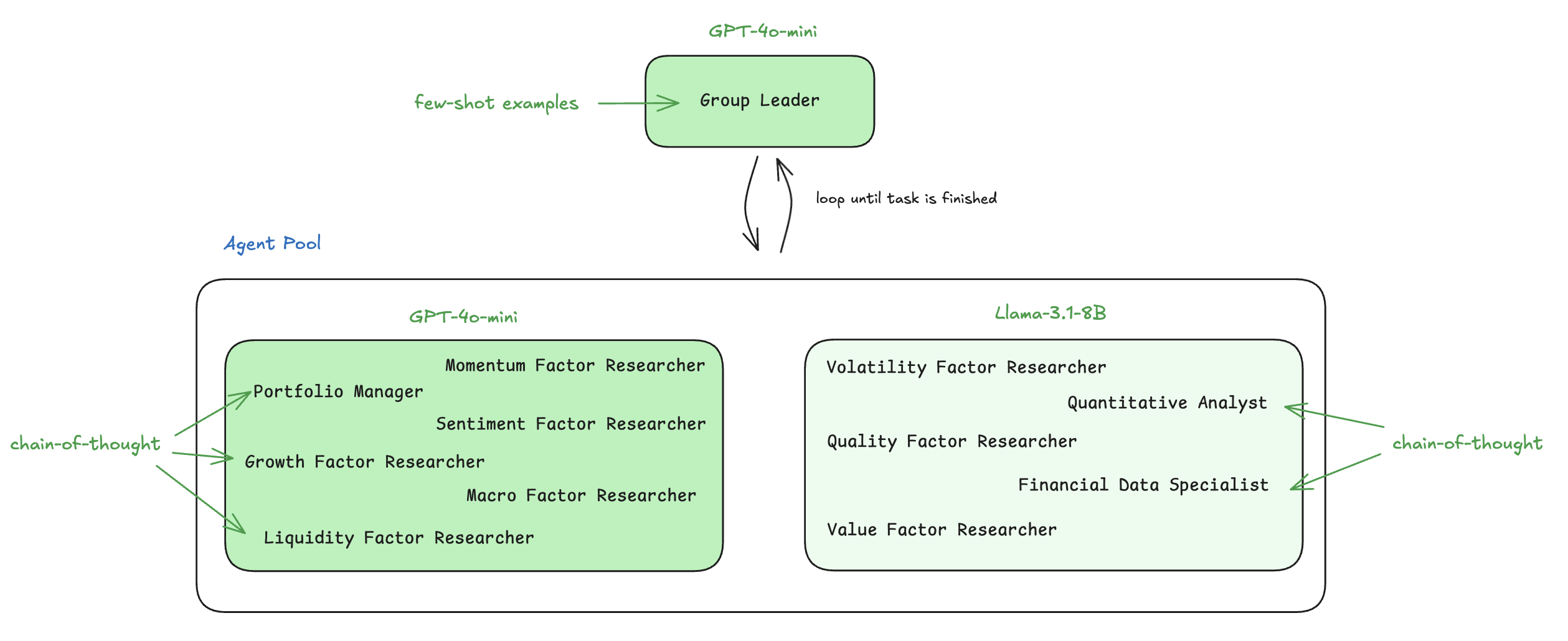
The few-shot examples for the group leader contain information about the task, current loop history (i.e., which agents have been called so far to accomplish this task), and remaining loop budget (i.e. how many more agents can be called to accomplish this task). Here are the 4 examples inserted into the prompt:
Demonstration 1:
Input (task): “Does the news headline talk about a general event (apart from prices) in the past? Please choose an answer from {Yes/No}. \n Gold futures edge up after two-session decline”Input (project_history): “\n—- Step 1 —-\nOrder: Sentiment_Factor_Researcher - Analyze the sentiment of the news headline to determine if it discusses a general event in the past.\nMember Response: To analyze the sentiment of…” (truncated for brevity)
Input (remaining_order_budget): “1”
Output (solution): “No”
Demonstration 2:
Input (task): “Offer your thoughts or opinion on the input financial query or topic using your financial background.\nWould the purchase of a car for a business through the use of a business loan be considered a business…” (truncated for brevity)Input (project_history): “Empty”
Input (remaining_order_budget): “3”
Output (solution): “Yes, the purchase of a car for a business through the use of a business loan would be considered a business expense. The cost of the car can be…” (truncated for brevity)
Demonstration 3:
Input (task): “Based on your financial expertise, provide your response or viewpoint on the given financial question or topic. The response format is open.\nHow can I estimate business taxes / filing fees for a business…” (truncated for brevity)Input (project_history): “\n—- Step 1 —-\nOrder: Financial_Data_Specialist - Gather information on typical business taxes and filing fees for businesses with $0 income.\nMember Response: Typical Business Taxes and Filing Fees…” (truncated for brevity)
Input (remaining_order_budget): “2”
Output (solution): “For a business with $0 income, the typical business taxes and filing fees include:\n\n1. Business Registration Fees: These fees vary by state…” (truncated for brevity)
Demonstration 4:
Input (task): “Offer your insights or judgment on the input financial query or topic using your financial expertise. Reply as normal question answering\n30% share in business”Input (project_history): “Empty”
Input (remaining_order_budget): “3”
Output (solution): “To offer insights on a 30% share in a business, it is essential to evaluate the overall valuation of the business, the potential for growth…” (truncated for brevity)
Check out more details on how to interpret optimization results.